COM271—Task 10
HTML Form Structure and Style
Given 10/14 | Due 10/16
Syllabus | Assignments | References and Useful Links
←Task 9 | Task 11→
Overview: Develop a Basic HTML Form, Style it, and Prepare it for Javascript Validation
Preparation: Readings from week 7 (HTML forms, introduction to Javascript). Meyer Project 7, "Making an Input Form Look Good." Also, look ahead to week 8, "JavaScript Form Validation," and study the Script and Form code sample found under "Preliminary Step."
Styling and HTML Form
Load the absolute position page from the , "8_absolute_positioning.shtml," task 8 and saving as "10_html_form.shtml". Add this new page to your navigation file with the link "html form."
Proceed as follows:
- Update the banner and title element with "HTML Form".
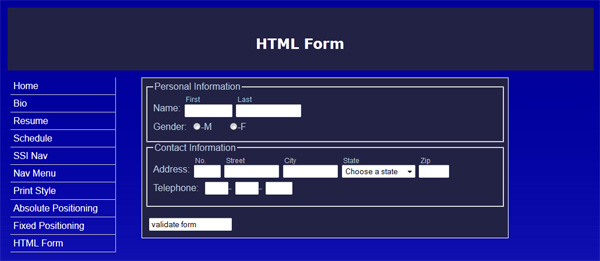
- Use <formset> and <legend> tags to group information visually (personal and contact groups). Use CSS to make this an attractive and space-efficient screen. Develop a simple 2-part form, with sections for personal and contact information, as follows:
- Personal Information
- First Name (text box)
- Last Name (text box)
- Gender (male or female) (radio buttons)
- Contact Information
- Street Number (text box)
- Street Name (text box)
- City (text box)
- State (select list)
- Zip code (text box)
- Telephone (including area code) (3 text boxes)
- Suggestion (text area, 4 rows x 60 columns)
- Personal Information
Your form should look like the image above. Check in your browser, save, etc.
- To the form element, add a javascript event handler and call to a validate( ) function:
<form action="#" method="post" onsubmit="return validate();"> - In the <head> section, add this preliminary script (see week 8, "JavaScript Form Validation," preliminary step, above):
<script type="text/javascript" >
function validate()
{
alert('Testing: Button works and script is called...');
return true;
}
</script> - Test the script by clicking on the submit button. You should see an alert box with the message
"Testing: Button works and script is called...." - Save and move on to task 11, "Simple Form Validation."