COM271—Task 6
Styling Navigation Links
Given 2/9 | Due 2/9
Syllabus | Assignments | References and Useful Links
←Task 5 | Task 7→
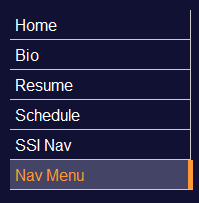
Overview: Develop style for navigation links to provide feedback for user rollovers.
Preparation: Readings from week 4 (styling text, the box model, color). Complete Meyer-on-CSS project5, "How to Skin a Menu."
Styling Navigation
Begin by loading 5_ssi_for_nav.shtml (task 5) and saving as "6_nav_style.shtml". (i.e., the content will be your schedule. To provide some variety, if you would like to use your bio or resume, you may elect to start by loading them instead; be sure to update with links to your external screen style sheet and the navigation server-side include.)
Proceed as follows:
- Update the banner text with "Navigation Menu Style". Also, update the <title> element in the header with "Navigation Style."
- Upgrade navigation html: Upgrade navigation links by streamlining structure and visual style. Start with the structure of the server-side include file for nativation, ssi/nav.ssi.
- Remove all <p> tags from the file. (Expedite this with Dreamweaver (Commands > Clean up XHTML).
- Add <nav> and </nav> at the beginning and end of the file. All of the navigation links are now contained in a nav element. This element was introduced in HTML5: it is recognized by most browsers.
- Save your navigation file (make sure it is being automatically uploaded to the server!) and close it.
- Upgrade CSS for navigation: On your external style sheet, css/screen.css, add selectors for nav, nav a, and nav a:hover. Style these following Meyer 5. Make navigation links block elements, adjust padding, margin, background color, color, text-decoration, and borders following Meyer. Do not neglect the right-border treatments. You are expected to replicate Meyer's style, with your own choices of color, font, thickness, etc.