COM271, Week 10
Advanced JavaScript—Super Hypertexts
Syllabus | Table of Pages | Assignments | References and Useful Links
Inspiration

The National Science Foundation (www.nsf.gov) operates a website that all Americans can truly be proud of. To convey the rich set of activities underwritten by NSF—including grants programs and reports on accomplishments—takes a prodigious web development effort.
One of my personal interests has been in NSF's "Science and Engineering Indicators," an immense collection of facts and figures describing all aspects of the Nation's science research enterprise. When I first became aware of this statistician's goldmine, it was available (for free!) as a very heavy, thick paper report, issued every two years. It was about half narrative—pages of wonkish text, tables, and graphs—and half extensive spreadsheets providing details. As technology evolved, the tables became available as CDs, and from the web. But going back and forth between data summaries and the underlying tables was cumbersome, and the size of pages was prohibitive. On the web, this was clearly an opportunity to take advantage of hypertext.
Take a look at this page: Chapter 5, Academic Research and Development. Note that the page is full of information, and equally full of footnotes written as superscripts. Click on any footnote (try [2]) and in the third paragraph click on note for figure 5-1. Then come back here (you'll be impressed). I'll wait....
Finding Code
Rushing ahead...
What follows is an example of seeing something in a web page, and going after the code to make it work. It may be that the codes are obscure or difficult to make work, perhaps deliberately. And certainly in the case of server-side technologies, you cannot actually see the code, short of illegal hacking of a server. But JavaScripts and style sheets must be downloaded for a browser to use them, and this means they are at least accessible.
.As I perused the source code for the NSF page (above), I easily found the links to external style sheets and scripts, and it was easy to also find relevant html and JavaScript:
<script type="text/javascript" src="../js/highslide-full.js"></script>
<link rel="stylesheet" type="text/css" href="../css/highslide.css" />
<script type="text/javascript" src="../js/lightboxconfig.js"></script>
<link rel="stylesheet" type="text/css" href="../css/tables.css" />
...
<p>Academic R&D is a significant part of the national R&D
enterprise.<sup><a href="#fn2" class="footnote" rel="highslide-ajax">[2]</a></sup>...
...(<a href="fig05-01.gif" class="highslide" rel="highslide">figure <nobr>5-1</nobr></a> <img src="../graphics/icons/figure.gif" ...)
Rushing ahead, I clicked on the javacript and css files and copied them to the server, also copying the calling page. I adjusted directories, fired up the page, and...nothing. It wasn't going to be that easy. What was I missing? Well, clearly there were some graphics missing somewhere. So...
A More Systematic Search for Code...
Opening the first javascript file, I found where the code had come from.
/******************************************************************************
Name: Highslide JS
Version: 4.1.8 (October 27 2009)
Config: default +events +unobtrusive +imagemap +slideshow +positioning +transitions +viewport +thumbstrip +inline +ajax +iframe +flash
Author: Torstein Hønsi
Support: http://highslide.com/support
Licence:
Highslide JS is licensed under a Creative Commons Attribution-NonCommercial 2.5
License (http://creativecommons.org/licenses/by-nc/2.5/).
You are free:
* to copy, distribute, display, and perform the work
* to make derivative works
The site highslide.com says,
Highslide JS is an image, media and gallery viewer written in JavaScript. These are some of its advantages:
- Quick and elegant looking.
- No plugins like Flash or Java required.
- Popup blockers are no problem. The content opens within the active browser window.
- Single click. After opening the image or HTML popup, the user can scroll further down or leave the page without closing it.
- Lots of configuration options and scalability without compromizing on simplicity. A component system lets you strip away unused features down to a filesize of 10kB.
- Outstanding, unconditional and free user support for both commercial and non-commercial users.
- Compatibility and safe degrading. If the user has disabled JavaScript or is using an old browser, the browser redirects directly to the image itself or to a given HTML page.
- Source code included.
A page of examples illustrates image galleries and an array of uses with content from HTML, AJAX, Iframe, Iframe with form, or as a display for flash or YouTube, for example, with a variety of animation effects.
Three license options are available, including a free non-commericial license, a single-site commerical license ($29), and an unlimited commercial license ($179).
Installation isn't as simple as my first attempt, but is not difficult after all:
Installation
Note: some basic HTML knowledge is required to install Highslide. For any problems in your installation, see Highslide support.
Alt. 1: Installation using the Editor:
The Highslide Editor is a visual tool that lets you configure most of the numerous Highslide options without writing code, and upload the results directly to your web server. This is not only a great help for non-developers, it also saves time for professionals who don't have to read through the API documentation to get things done. Go to the Editor.
Alt. 2: Manual installation:
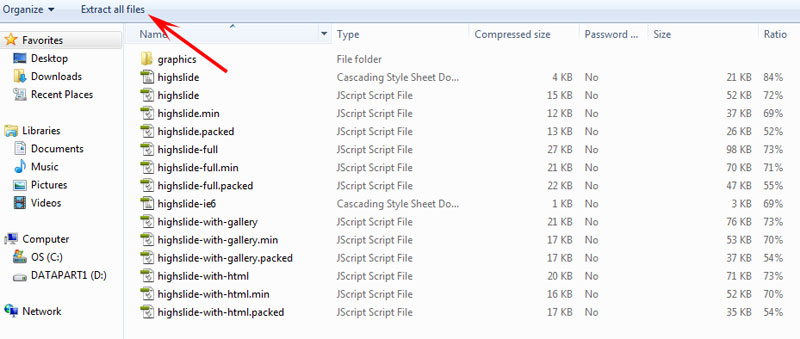
Download and extract the zip-archive from the download page.
Run the file index.html, navigate to your favourite setup and view the source.
Change the file to suit your needs, or copy and paste parts of it into your HTML file. If you mess it up, go back to the original file and change it bit by bit. Study the documentation and the API reference for advanced features.
If you move the Highslide JS files, remember to change the graphicsDir setting in the Javascript.
The intent of the editor is to create a subset of the javascript plus a set of configuration settings to display content based on options that you set with the editor. This reduces the amount of code and download time. Noticeable delay in download of highslide pages is for graphics and javascipt files.
From the installation page, I chose to download a zip file of all scripts, style sheets, and a file of graphics (back arrows, frame elements, etc.). You wouldn't be able to see these with a simple file grab, which was part of the reason my first pass approached failed. I extracted the zip files into a highslide folder at the root of my text files (the root of this page's file); you can place these files where you want, but you need to then edit the files to point to the graphics directory, for example. The CSS file directories also have to be in the correct place. A little attention to the directions, and this wasn't too difficult.
It was pretty cool when the first footnote actually opened.
For Dreamweaver users, there is also a 6 page pdf outlining steps to take to get files lined up and code references straight.
How To
For this course, all lecture pages are in the folder notes, which I designate as the root folder for this exercise. From the Highslide download page, I downloaded the zipped files, then extracted them to a new folder, highslide, in my root folder (i.e., notes/highslide).
To see whether this works, I cut and paste sections from the NSF page (above), including content:
Academic R&D Within the National R&D Enterprise
Universities and colleges play an important role in the nation's overall R&D effort, especially by contributing to the generation of new knowledge through basic research.[3] Since 1998, basic research performed within institutions of higher education has accounted for more than half of the basic research performed in the United States.
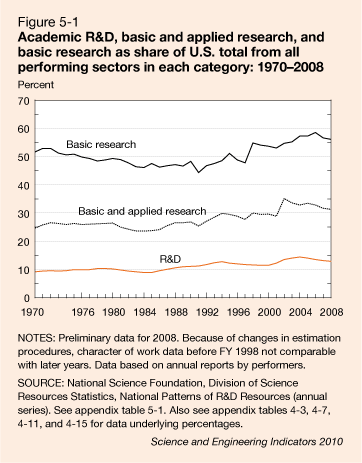
In 2008, U.S. universities and colleges spent $52 billion ($42 billion in constant 2000 dollars) on R&D. Higher education's prominence as an R&D performer increased slightly during the past three decades, rising from about 10% of all R&D performed in the United States in the early 1970s to an estimated 13% in 2008 (figure  ). For a comparison with other countries, see "International R&D Comparisons"
in chapter 4.
). For a comparison with other countries, see "International R&D Comparisons"
in chapter 4.
I also included part of the NSF basic style sheet (removing everything except for descendents of the div class="content-left"), placing this style sheet in the root folder
<link rel="stylesheet" href="css/style.css" type="text/css"/>
Going back to the NSF code, I cut and pasted the script tags and css links and modified them for my directories...
<script type="text/javascript" src="highslide/highslide.config.js" charset="utf-8"></script>
<script type="text/javascript" src="highslide/lightboxconfig.js"></script>
<link rel="stylesheet" type="text/css" href="highslide/highslide.css" />
The content of the footnote 3 also must be included on the page, in a div (all footnotes are not displayed on the screen version because visibility is set to hidden. On the print version, they appear on the bottom of the printed page):
<div id="fn3"><a name="fn3" id="fn3"></a><strong>[3]</strong>
For this discussion, the terms <em>universities and colleges,
higher education,</em> and <em>academic institutions</em> are used
interchangeably and include only those schools that grant a bachelor's or higher degree in science or engineering and
spend at least $150,000 for separately budgeted R&D in S&E.</div> </div><!--footnotes-->
The structure of the text boxes is not at all apparent because it is not contained on the html page itself. It exists within the javascript page, but may be nearly impossible for beginning level javascript jockeys to identify. Fortunately, the css selectors are reasonably named and not hard to associate with what appears on the page. This made it easy for me to find the appropriate selector for the expanded box itself, allowing me to rewrite background color, font, color, etc. to conform with the style on the rest of the page:
.highslide-container div {font: 11px arial, Verdana, Helvetica;background:#224;border:1px solid #779;color:#99f;
}
The highslide site also has a Javascript API Reference which defines and provides examples for javascript variables.
For the second footnote, I needed the html and I needed to provide two images, one the content of the expanded window and the other the small image icon ():
<a href="../images/fig05-01.gif" class="highslide" rel="highslide">figure <nobr>5-1</nobr></a> <img src="../images/nsf_figure.gif" width="16" height="15" alt="" title="figure"/>
It wasn't a trivial matter to look at the NSF page and to be able to repeat the same effects with my own material. If you have a little time and a bit of patience, the highslide site has all of the code, plenty of examples, an editor to practice styles and to carve out all of the javascript you'll need. With the examples, the tutorial, etc., I was able to adapt a nifty set of scripts to create a very effective way of packing lots of information onto a page, quickly retrieveable with quick clicks on footnotes. I can't wait to begin applying this to some of my heavily footnoted online lecture notes!