COM271, Week 6
Simple Background Gradient Fills
Syllabus | Table of Pages | Assignments | References and Useful Links
Background Fills: This page contains a fixed-positioned gradient background image, a vertical stripe, repeated across the page, making the page appear to be darker at the top and lighter at the bottom. The background is an image, attached to the page through the body element in the style sheet:
<style media="screen" type="text/css">
body{background:#006 url(../images/vert_gradient_009-006_10w_x_1000h.jpg) repeat fixed;}
</style>
Here is how I made one. In photoshop, choose the file>new option and fill in the menu to set up a working image that is 10 pixels wide and 1000 pixels high. Name it to reflect the colors at the end of the gradient and the image size, as follows: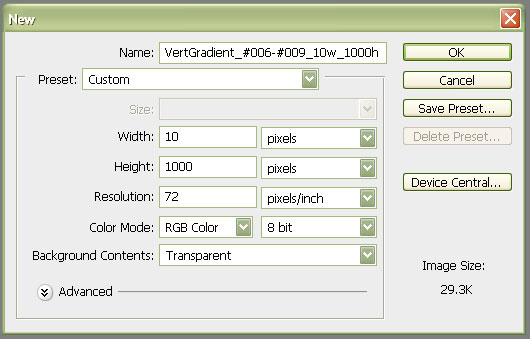
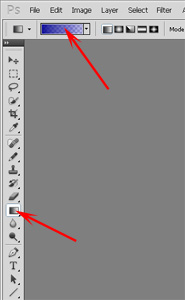
Choose the gradient tool (lower arrow pointing to tool bar) and click on the gradient drop down icon (upper arrow) to open the gradient editor.
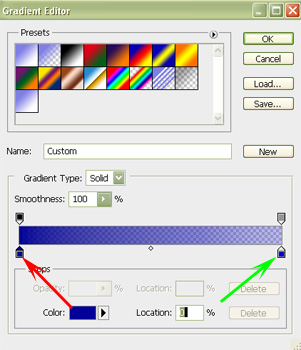
In the gradient select window, click on the left color stop (red arrow) and set the darker color (#000099). Click on the right color stop (green arrow) and set the lighter color (#000066). Click OK.
The gradient tool (still selected) is now "loaded" with the gradient. Click within the top of the 10x1000 image, drag to the bottom, release. Save the image for the web (file>save for web) as a jpeg image.
Note in the style sheet (above), that the background attribute includes both a background color (#006) and the image. If the image is not long enough to fill the screen, the background color will pick up with the lighter color, giving a solid color beneath the gradient. Be sure to choose the lighter color such that it is still of sufficient contrast with your foreground (text) color to make the text readable. Note here that the background is fixed, and the gradient does not scroll with the page. Note, too, that the image is small (only 10 pixels wide), but that it repeats, completely covering the background.