COM271, Week 6
Backgrounds With Foreground Transparency Effects
Syllabus | Table of Pages | Assignments | References and Useful Links
In Eric Meyer on CSS, project 12 provided a neat way to create the illusion of looking at a fixed background through a tinted foreground layer. In 2003, this required the creation of additional images (in Photoshop) tinted to a unique shade for each tint desired. For example, in addition to a bright original background, a navigation menu might have a blue-tint for links and a grey-tint to rollover effects with those links. The project then involved fixing the correct versions of the images within divs to create the transparency effect.
Meyer developed this approach because in 2003, there was as yet no reliable CSS transparency property. Jump forward a decade, and we now have the CSS property opacity, which takes values from 0 to 1.0. Can we use this to achieve Meyer's project 12 effect with simpler CSS and only one image (saving download time, not to mention a few minutes of photoshop work)? Of course we can. Here's how:
Selecting an image: I'm choosing an image for use as a background on the left side of the page. It has bright colors and is large enough to be attractive. The wings extend to the right and will run into my intended content area. The half of the image that contains the wings contains no other imagery, and the wings themselves are relatively simple. These two characteristics make the image useful as a background for content-area text, as there should be relatively little visual interference to reduce text readability.
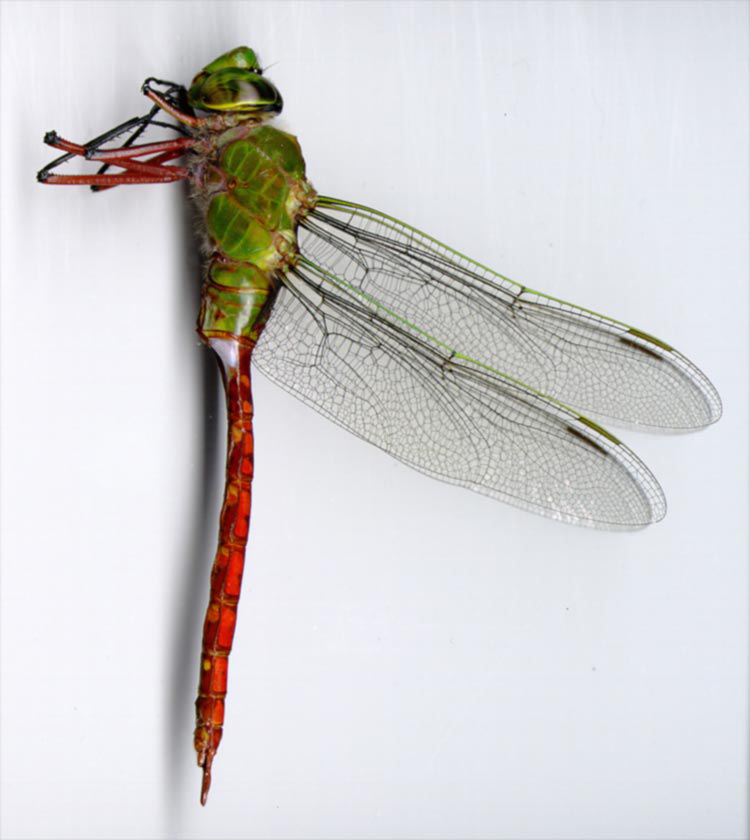
Structure and basic CSS: I'll use the familiar two divs for navigation and content. We'll take advantage of the HTML5 element <nav> for the navigation div. I'll embed both in a positioning wrapper.
Lorem Ipsum
Lorem ipsum dolor sit amet, consectetur adipiscing elit. Vestibulum orci nulla, pulvinar eu rutrum vel, molestie sed dui. Aliquam tristique, eros a porttitor placerat, leo neque faucibus mi, quis posuere libero nisi sit amet magna. Nulla blandit sapien eget nibh tempor interdum. Ut nisl enim, facilisis sed gravida varius, vehicula at diam. Aenean a dui massa. Cras tempus, augue et ultricies ornare, libero dui semper velit, sit amet accumsan dui lectus eu eros. In lectus erat, cursus in aliquet id, porta a sapien. Praesent non quam dolor, faucibus posuere dui. Mauris accumsan, orci a fermentum condimentum, turpis dui sollicitudin felis, quis placerat ligula mauris at ligula. Nam nibh leo, pharetra at vulputate in, viverra ut ligula. Aliquam erat volutpat. Integer euismod posuere porta. Cras nec turpis non est laoreet accumsan ac nec nibh. Vestibulum venenatis metus ac velit posuere id ultrices eros accumsan. Mauris tincidunt odio ac sem scelerisque ac tempus diam iaculis. Nullam cursus mi quis orci sagittis suscipit.
Morbi condimentum porttitor nunc, quis scelerisque velit laoreet at. Vestibulum purus risus, feugiat non venenatis ac, cursus nec massa. Aliquam mattis aliquet hendrerit. Quisque lectus lacus, malesuada fermentum euismod sit amet, convallis vel arcu. Ut placerat pulvinar accumsan. In dui elit, gravida id tempor vitae, condimentum vitae tortor. Integer posuere, ligula sed pharetra fermentum, mauris tortor euismod tortor, eu dignissim nisl lorem ac neque. Suspendisse placerat dapibus justo ut mollis. Quisque quis mauris at augue tincidunt lobortis. Nulla facilisi. Nunc iaculis est sed nisl imperdiet at porttitor ante tincidunt.
Structure:
<div id="wrap">
<nav><a href="#">Link 1</a><a href="#">Link 2</a> etc....</nav>
<div id="content2">
<h4>Lorem Ipsum</h4>
<p>Lorem ipsum .....</p>
</div><!--content2-->
CSS:
#wrap{position:relative;left:0;padding:0;border:1px solid black;background:#ddd url(../images/anax_longipes.jpg) scroll -100px 0 no-repeat;padding:5px;margin-bottom:10px;width:800px;}
div#content2{margin:0 0 0 220px;width:500px;border:1px solid red;padding:10px 10px 50px 10px;background-color:#363;color:#ffc;opacity:0.8;}
nav{width:200px;padding:0;margin:5px 0 0 0;background:transparent url(../images/anax_lognipes.jpg) scroll -100px 0 no-repeat 0 0;position:absolute;top:0;left:10px;}
nav a{display:block;padding:10px;font:16px Verdana, Geneva, sans-serif;text-decoration:none;border-bottom:1px solid #ccc;background-color: #033;opacity:0.7;color:#FF9;}
nav a:hover{opacity:.9;color:#ccc;}